
Photography Calculators: Seven New Tools and a Refresh for the Originals
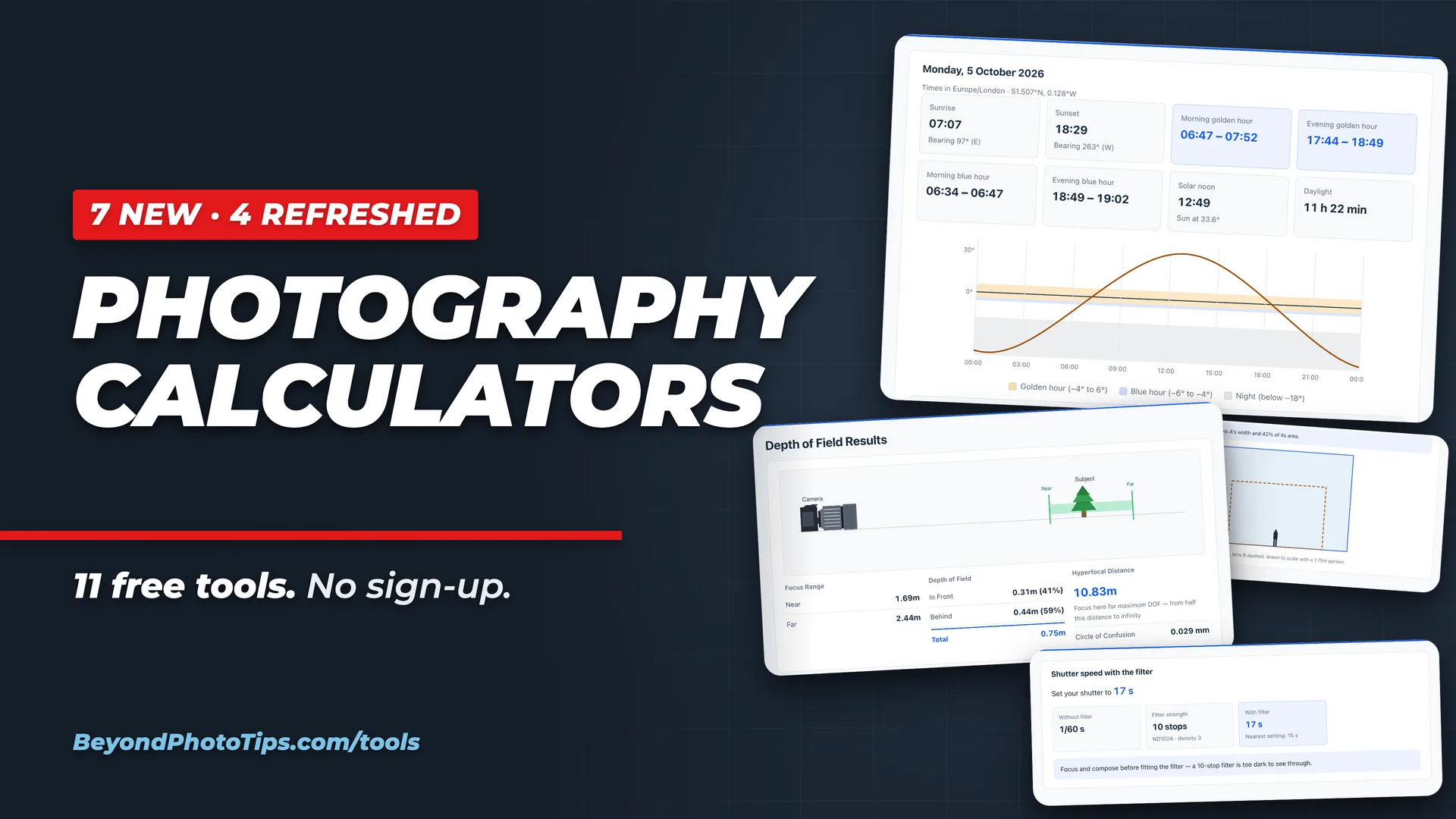
Table of Contents
- So What’s With These New Photography Calculators?
- Plan the Photo
- Field of View Calculator
- Golden Hour Calculator
- Astrophotography Calculator
- Time-lapse Calculator
- Macro Photography Calculator
- Exposure and Light
- ND Filter Calculator
- Flash Guide Number Calculator
- What’s Changed in the Original Four Calculators?
- So What Does This Mean for You?
- Key Takeaways
Greetings everyone… The photography calculators on Beyond Photo Tips have grown from four to eleven. Seven of the calculators are brand new, covering field of view, golden hour, astrophotography, time-lapse, macro, ND filters and flash, and the original four have had a refresh. They’re all free, with no sign-up, at beyondphototips.com/tools.
Last November, I put four little calculators online: tools I’d built for myself because the ones I was using didn’t quite do what I needed. You’ve been using them far more than I expected (thank you!), and that got me thinking… if four were useful, what else do photographers end up working out on the back of an envelope? So I went back to the drawing board. Here’s what came out of it.
So What’s With These New Photography Calculators?
The calculators are now arranged in three groups, by the job you’re doing. If you just want to dive in, here’s the short version:
- Need to know how much a lens will take in? → Field of View Calculator
- Planning a sunrise or sunset shoot? → Golden Hour Calculator
- Want pin-sharp stars? → Astrophotography Calculator
- Shooting a time-lapse? → Time-lapse Calculator
- Working close up? → Macro Photography Calculator
- Stacking on an ND filter? → ND Filter Calculator
- Lighting with a flashgun? → Flash Guide Number Calculator
And the four you already know, all refreshed: the Depth of Field Calculator, the Print Size Calculator, the Rent vs Buy Calculator and the Silica Gel Calculator.
Plan the Photo
Most of the new calculators are about the work you do before you pick up the camera: where to stand, which lens to bring, and when the light will be right. Here’s a little more detail about that.
Field of View Calculator
The Field of View Calculator shows how much of a scene a lens takes in, both as an angle and as the actual width and height of the frame at any distance. You can put two lenses or two cameras side by side, which is handy when you’re deciding what to pack, or work backwards from a subject to find the focal length that fits it exactly. If you’re thinking of buying a lens, it pairs nicely with the Camera Lens Buying Guide.
Golden Hour Calculator
The Golden Hour Calculator gives you sunrise, sunset, golden hour, blue hour and all three stages of twilight (civil, nautical and astronomical) for any place and any date, in that location’s own time zone. It also gives the compass bearing of sunrise and sunset, and a chart of the Sun’s height through the day, so you know in advance where the light will come from and how long you’ll have it.
Astrophotography Calculator
Use the Astrophotography Calculator to find the longest exposure you can make before the stars start to streak. It uses the NPF rule, which takes your camera’s pixel size, your lens and the part of the sky you’re pointing at into account. That makes it far more reliable on modern high-resolution sensors than the old 500 rule (which is still there if you want to compare). It also plans star trail sequences.
Time-lapse Calculator
The Time-lapse Calculator works out the interval, the number of frames, the length of the finished clip and the shutter speed. It starts from either the length of the event or the length of clip you want. It also tells you how much card space you’ll need and how many batteries, which is exactly the kind of thing you don’t want to discover halfway through a sunset.
Macro Photography Calculator
The Macro Photography Calculator handles the maths that makes close-up work so fiddly: magnification with extension tubes and close-up filters, roughly how far the subject will be from the lens, effective aperture (how much light you lose as you get closer), depth of field measured in fractions of a millimetre, and how many frames a focus stack needs. If you’re still choosing your gear, start with Choosing the Best Lens for Macro Photography.
Exposure and Light
ND Filter Calculator
The ND Filter Calculator gives you the long-exposure shutter speed for any ND filter, from ND8 all the way to 15 stops. My favourite bit: when the exposure runs into minutes, there’s a built-in countdown timer for Bulb mode, so you don’t have to fumble with your phone’s stopwatch in the cold. It also lists equivalent exposures and the exposure value. For a refresher on filters themselves, see Understanding Photographic Filters for Your Lens.
Flash Guide Number Calculator
The Flash Guide Number Calculator uses your flash’s guide number to find the aperture, the distance or the power setting at any ISO. It allows for modifiers and bounce, and it can combine several flashes into one figure.
What’s Changed in the Original Four Calculators?
The four originals have each had a refresh, mostly to answer the next question you’d naturally ask.
- Depth of Field Calculator: you can now tell it how much depth of field you need, and it works out the aperture and distance for you. It also has a printable hyperfocal chart (a nice thing to keep in your camera bag; see Hyperfocal Distance in Street Photography for why), a focus stacking planner, and close-up figures once you get near your subject.
- Print Size Calculator: the quality check now shows your image with the print’s crop marked on it, so you can see what gets trimmed. There’s a new mat and frame planner that suggests the nearest ready-made frame, and presets for different kinds of print (photo lab, giclée, canvas, metal and more). If PPI, DPI and LPI still muddle you, this explainer should help.
- Rent vs Buy Calculator: the assumptions that used to be fixed are now yours to change: the number of years you’re comparing over, resale value, maintenance, rental damage waivers and shipping. The break-even point is also more honest. If renting stays cheaper, it says so instead of inventing a number.
- Silica Gel Calculator: it now takes the temperature where you store your gear into account (warm air holds a lot more moisture), and it can add a repeating reminder to your calendar so you never forget to recharge the silica gel again.
So What Does This Mean for You?
A few things apply to every calculator:
- They’re free, with no registration and no email sign-up. Just open one and go…
- You can share a result. Every result has a “Share results” button that creates a link. Anyone who opens it (including future you) gets the calculator back with the same settings filled in.
- You can print a result. Handy for the hyperfocal chart, or a time-lapse plan you want in your pocket.
- They work on your phone, which is where you’ll want them when you’re out shooting.
Not everything is perfect yet, and I’ll keep improving them over the coming weeks, months, and years, and for this, I could certainly use your help. If you spot a bug, or there’s a calculator you wish existed, drop me a line. Several of these new ones started out as exactly that kind of “I wish there were a tool for…” moment.
Key Takeaways
- The Beyond Photo Tips photography calculators have grown from four to eleven, and all are free with no sign-up.
- The seven new ones: Field of View, Golden Hour, Astrophotography, Time-lapse, Macro, ND Filter and Flash Guide Number.
- The original four (Depth of Field, Print Size, Rent vs Buy and Silica Gel) have new features.
- Every result can be shared as a link or printed.
Bookmark beyondphototips.com/tools and keep it handy for your next shoot. I hope they save you as much head-scratching as they’ve saved me!
Related Posts

Sony A7 V Overview: The Hybrid Camera Perfected?
Announcement and Specifications of the Sony A7 V Hybrid mirrorless camera.

4 Essential Photography Calculators Every Photographer Should Bookmark
Use these free photography calculators to figure out how to improve your images online. Figure out Print size, Depth of Field, Dry Silica Gel, & more.
Canon EOS R5 Mark II Specs
Canon announced their update to the EOS R5, the EOS R5 Mark II today. As expected, the specs are a step up from the original R5. The sensor size is the same, though it is a new sensor with higher readouts. The Auto-Focus…

Link Roundup #001
Welcome to Beyond Photo Tips' very first photography link roundup. In this brand new series of weekly posts, we are going to bring you, a glimpse of everything that we found interesting in the week gone by.