Beyond Phototips

Avatar

Photography for the Serious Amateur.

11 Things To Do With Your Cameraphone While You Wait

by Susheel Chandradhas

Waiting is difficult to put up with in today’s fast paced world. There’s a tonne of things to learn out there, and we’d never get to learn all we want to learn, or do all that we want to do if we sat around waiting - doing nothing in that time.

But what of those times where you’ve found yourself forced to wait, with nothing to do but to twiddle your thumbs; like when you’re waiting for a bus, a train, or an airplane that’s delayed? Could you use this time to improve your photography, instead of letting your brain cells die a boring death?

Well lets say, you’re waiting for a bus, or waiting for a table at your favourite lunch spot. You don’t have your handy-dandy pocket book, and you’ve left your work at the workplace (a handy place to leave it). You do have your cell phone though, and your phone does have a camera. How handy! Here are a couple of things to do with your cell phone, to improve your eye for photographs, and make you a better photographer!

1. Try Impossible angles: Camera Phones fit in your hand… Your hand fits in places where your head would never go.. Use your hand.

Try putting your hand in a large jar; what does it see? Raise your hand out of your car window, hold it out of your bedroom window, hold it near your skates when you’re skating, hold it 3 feet out of a balcony and look down; you’re likely to find a whole new world, and its all in your hands…

Unusual Angle by b.e.n

2. Go Abstract: Try to find the unusual in the usual. This is one of those times to “see” the unusual. Many of us try to pick out the unusual only when we’re with a camera - in “camera mode”. Wouldn’t it be more fun if you could do that all the time, now that your cameraphone is with you, in your pocket?

Look for that abstract representation… bubbles in a paperweight, Streaks of coloured light on a wall, Markings on a road taken out of context, they’re all out there for you to discover, and you don’t even need a camera… Just your mobile phone, your cameraphone!

Image by b.e.n.Abstract by b.e.n.

3. Take a Photograph - practice composition: No, not a snapshot, a photograph! See it, think it throughPicture it in your head… Then take the photograph. Look for interesting perspectives, and even more interesting juxtapositions; waiting in an airport has never been more rewarding than now.

Nozomi at Fukura by LschoenComposition by ISphoto

4. Try a Panorama: Some camera phones offer the option of making panoramas… They’re a good thing to try, because they offer you a view that you very rarely ever see. I believe that they make you look at the place you’re standing at with a “wider” perspective.

Symmetry by Coda\Guns \'n\' Roses Panorama by Drunken Monkey

5. Go Back to Basics: Photography students are asked to take photographs of textures, patterns and such, in an effort to make them understand their importance and to teach them how to incorporate them into their regular photographs for heightened impact. You could do the same.

Which winds may move this flag? by Ionushia texture by hidden side\

6. Try New Points of View: Ever wondered what your dog or cat sees from its height? You spend hours watching your TV; what does it see? What does your fridge see when you peer into it? Try to simulate this stuff with your cameraphone..

perspective by fabbiolookin\' up by hugovk

7. Discover: Your cameraphone is with you more often than your camera. Use it to keep records of places and things that you discover. Rename the files immediately so that you remember where / what it is.

Image of a Subway by FabbioPhotograph of \metropolitana by Marta P.

8. Try Some Portraits: Bus stops have this great quality about them… They’re a collecting point for people. The same goes for train stations, subways, and airports. If you ever find yourself stuck at one of them waiting for a bus, train or airplane, all you have to do is whip out your mobile phone. It is always a challenge to approach somebody you’ve never met before, especially in a public place where they’re not expecting to be approached, but if you think you can, then go for it. Alternatively, you could take some candid street photography.

9. Record Yourself: Self portraits have always been an intriguing art, and a defining record of who you are, and what you were. Try them out to remind yourself of that…

self by KK+self by livia pattaself by edward

10. Find Objects: Cities are great places to find interesting things. They’re literally strewn around alleyways, waiting for you to find them and photograph them

Lanterns by IshronaBike by Databhifound by ISphoto

11. Make a Montage: You’ve got the camera, you’ve got the flash memory storage in your phone… why dont you make a montage of everything that’s happening around you?

Sunset & Rainbow by FlipaggingWaiting (montage) by Heather

There are so many more things that you can do in the “camera” mode of your camera phone… These are just a few of them. Do you have some other favourite function for your phone? Let us know!

Share this Phototip: These icons link to social bookmarking sites where readers can share and discover new web pages.
  • Digg
  • del.icio.us
  • StumbleUpon
  • Technorati
  • YahooMyWeb
  • TwitThis

Point n go shoot

by Susheel Chandradhas

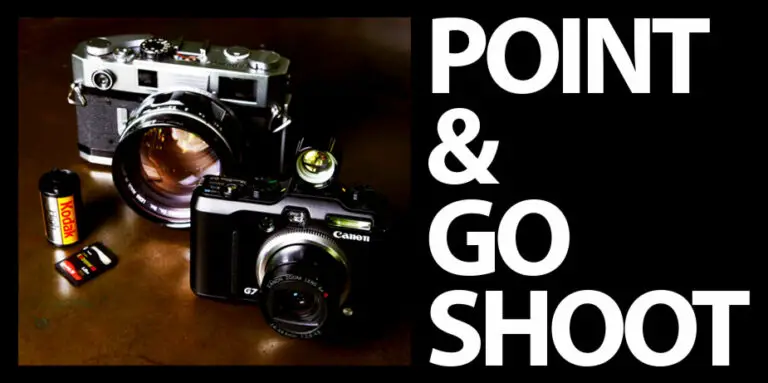
Photograph of one rangefinder and a digital camera by The JohannEspiritu™

Hi there… I need a bit of help; for a change, I need you, yes You… to share some information with me. It doesn’t matter if you’re new to photography or not, your opinion is welcome. What information? Well, do read on…

All these years I’ve been taking pictures with SLR and D-SLR cameras and I’ve never really really had a point and shoot digital camera, or a point and shoot film camera for that matter. I’ve recently had a revelation though…

Off late, I’ve been noticing that there are a lot of things that I really do want to photograph, but I really don’t want to have the hassle of lugging around a big, expensive piece of equipment. I have used other people’s point and shoot digital cameras in the past and I’ve enjoyed the experience. So, I’m looking to buy one for myself.

So now I come to you, my experienced reader, because I need help in choosing a good point and shoot digital camera. I’d posted this on my shiny new personal blog a while ago, but the problem there is that hardly anyone knows it exists… Well, so far Johann has suggested the slightly bulky Canon G7 which he himself uses and the Fuji Finepix F31fd, and Trish suggested the Canon Powershot SD630.

Important criteria to me are the camera’s capabilities in low-light situations, it’s size, and its ruggedness. This is a camera that I’ll want to keep in my pocket all day, even if I’m on a photo-shoot, so ruggedness is a real factor.

Any Suggestions? Do let me know…

Share this Phototip: These icons link to social bookmarking sites where readers can share and discover new web pages.
  • Digg
  • del.icio.us
  • StumbleUpon
  • Technorati
  • YahooMyWeb
  • TwitThis

8 Ways to Keep your Compositions Simple

by Susheel Chandradhas

Simple composition of a white window in an orange wall by Zamm

Keep It Simple, Stupid
Remember the K.I.S.S. principle… It needs no introduction.

First the why
Why would you want to leave things out of a frame? More the merrier, right? The bigger, the better, right? Umm… sometimes, yes… But not here. You see, when people look at a photograph, they expect to understand what it is you’re trying to communicate right away, without having to wait. Today, when everybody uploads about 20-200 pictures to flickr a day, you really do have to have an eye catching photograph for it to stand out at all… you could do that by having a great subject, or by having a simple subject and simplifying it further. Remember, less is more!

Now the how:

  1. Go in close to the subject. This could either mean moving closer physically, or changing your lens to a longer focal length one or if its something small, it could mean changing to a macro setup.
  2. Cut the Clutter. Very often we fail to realise that there are elements inside the frame that are not really needed. Remove anything that does not ‘belong’ in the frame. It could be as simple as taking a step to the side to remove the interfering bum of a relative while photographing your nephew at Christmas, but it could make a vast difference.
  3. Keep an eye on the background. Backgrounds are very important. They contribute to the mood of a photograph no matter how much out of focus they are. If your photograph has a background, make sure that it does not interfere with your foreground elements and distract the viewer from the experience that you’re trying to share.
  4. Fill the frame. This is a great way to get rid of an interfering background. Step in close, and fill the frame with your subject. If you’re doing a portrait of a child, go down to her level and fill the frame with a tight close up.
  5. Use backgrounds to your advantage. This may sound like a contradiction to the previous two points, but let me assure you that it’s not. What I mean is that when you have a clean, clear background, make use of it. You can always use ‘white-space’ to de-clutter a photograph, bringing the subject into clear relief. When doing this, remember that if you can find a textured background without many distinguishing marks, this will do very nicely too.
  6. Use simple light. A couple of photographers have told me, “there’s only one sun, so why should I use 4 lights” what they mean is that the more directional lights you have, the more unrealistic your photograph will look. While this is not always a bad thing, you may want to take simple photographs with clear cut lighting so that the lighting does not take meaning away from your subject.
  7. Use simple colours. Yes, even the hues and shades of a photograph can make it either complex or simple. Try to make sure that your compositions don’t have too many colours. Very often, a photograph can be sufficiently varied, yet simple, by simply having various shades of the same colour.
  8. Above all, keep your equipment simple, stupid. Very often we get carried away with all the lenses and gadgetry that we may own. I know that I do, but I try to remind myself to choose the lens that I’m most likely to use, with maximum advantage to me. That way, when it comes to crunch time, and there’s a photograph you’re about to take, you know exactly what you have in hand, and you’ll be able to make the most of that. It’s all too easy to find yourself changing lenses when you come across that rare tiger spotting… or while your child is taking her first few steps.

Remember, always to breathe deeply and relax when you find that you’re not sure about what you’re going to do. Then, remember these 8 simple steps and you’re on your way to taking some remarkably simple, yet memorable pictures.

Share this Phototip: These icons link to social bookmarking sites where readers can share and discover new web pages.
  • Digg
  • del.icio.us
  • StumbleUpon
  • Technorati
  • YahooMyWeb
  • TwitThis

8 Good Habits for Creative Photographers

by Susheel Chandradhas

How do you derive inspiration for your picture-taking? How do you stay creative? How do you get creative to start with? I’m hoping to open up some answers here, but you’re welcome to add to this list in the comments section.

Keep your mind open

discarded roses on concrete by ‘SeraphimC

There’s nothing on this planet that can ‘not inspire’. If you look at a piece of trash and say “How could I possibly be inspired by this?” you’re not looking beyond the obvious. Here’s a couple of different ways in which to look at a piece of trash:

  • [Read more →]

    Share this Phototip: These icons link to social bookmarking sites where readers can share and discover new web pages.
    • Digg
    • del.icio.us
    • StumbleUpon
    • Technorati
    • YahooMyWeb
    • TwitThis

Photo Project: Low light photography

by Susheel Chandradhas

Silhouette of a man on a hill, in fog with lights behind by Charlietyack

Photography is all about light. How you see it, how it affects a scene, and how that affects the person viewing the photograph. The dark black & white photograph taken with fast film, with its characteristic grainy ‘texture’ will always draw people to it…

Lets take a peek into what equipment you’ll need and what you can do with it…

[Read more →]

Share this Phototip: These icons link to social bookmarking sites where readers can share and discover new web pages.
  • Digg
  • del.icio.us
  • StumbleUpon
  • Technorati
  • YahooMyWeb
  • TwitThis

Filter Fun

by Susheel Chandradhas

Why Filters are fun
Filters have always been a fun thing for me in my photography, they allow you to take a photograph of a normal scene, and make it look extraordinary. There are various kinds of filters, coloured filters and special effects filters.

Colour Filters essentially add and subtract colour from the scene. For example, a yellow filter allows the frequencies of light that show up as yellow to pass through while reducing light of the opposite colour, blue. This is useful to know when you’re using filters for colour correction and when using filters for black and white photography. We’ll discuss those in more depth later, right now I want to get to the more interesting, special effects filters.

Neutral Density (ND) Filters decrease the amount of light that goes through the lens without changing its colour. This is great if you want to use a slow shutter speed or ISO on a bright day… You could also use it when you need to use a wider aperture for more depth of field. The effects that you can achieve with this filter are only limited by your imagination.

by Younes Bounhar

Graduated Filters are great on bright days when you want to get both your sky and land exposed well. Very often, we see pictures with well exposed land masses but totally white skies or vice versa, great blue skies but dark landmasses. A Graduated Neutral Density filter is clear on one side, but progressively gets darker, like an ND filter. There are also coloured graduated filters for other effects… Its important to remember that this gradation is affected by the aperture. The smaller the aperture (usually f/8 and smaller), the softer the apparent gradation. Large apertures could result in the gradation appearing as a narrow line…

Starburst Filters are good if the subject that you’re photographing is dark point sources of light. Take a small city lane at night, for example, most of the scene is dark with some lit areas and some street lights. The streetlights are point sources of light and when used with this filter will diffract into star patterns.

Diopter Filters are also called close up lenses. The allow you to focus at closer distances, making it ideal for close up or macro photographs. They are cheap compared to macro lenses or extension tubes/bellows and are a great way to explore the world of macro photography without the expenditure.

Photograph of a Tulipby gaspi

Soft Focus Filters are filters that slightly diffuse a photograph. Most soft focus filters have a more pronounced effect in the brighter areas of the photograph. As the name suggests, Soft Focus Filters make the photograph look soft. This is useful for portraits where the photographer wants to achieve a nostalgic or ethereal look or maybe just give the photograph a diffused, glowy feel. Some photographers also use an old UV filter smeared with a thin coating of petroleum jelly to get a similar effect. The advantage of using this method is that the photographer can smear the outer edges alone and leave the center sharp.

An important point to note is that cameras with Through The Lens (TTL) metering - which means all modern SLR cameras - will automatically adjust for all filters that are fitted in front of the lens. So, don’t worry about compensating for them. If you have an older camera which uses manual metering, and uses a lightmeter that does not take readings through the lens, you may have to compensate for each filter’s filter factor.

But remember, no matter what filters you use, its the content and composition that will make your pictures stand out. Filters only help you capture what you’ve got in your mind.

Share this Phototip: These icons link to social bookmarking sites where readers can share and discover new web pages.
  • Digg
  • del.icio.us
  • StumbleUpon
  • Technorati
  • YahooMyWeb
  • TwitThis

Photo Project: Photo Stories

by Susheel Chandradhas

Back to school, Baby! We’re doing essays!

photo by arndalarm

Don’t you remember how you hated doing essays in school? First you had to come up with a topic, or you’d be assigned one, then you’d have to research the essay, make notes and finally write the essay! Oh, the piles of books that would have to be read and sometimes referenced! and do you remember the library? [sigh] I mean, want to forget the library?

Well, now here’s a chance to get back at the establishment!

[Read more →]

Share this Phototip: These icons link to social bookmarking sites where readers can share and discover new web pages.
  • Digg
  • del.icio.us
  • StumbleUpon
  • Technorati
  • YahooMyWeb
  • TwitThis

How to Take Better Party Pictures!

by Susheel Chandradhas

Here’s a short tutorial with tips on how to take distinctive party pictures. You’ll find both equipment tips and photo tips on how to take the best party pictures ever!

There are party pictures and there are party pictures, but how do you make sure that yours stand out from the crowd? This series of tips is for all you compact digital camera users who want to make sure that every one else ogles at your pictures. The first few tips are about your camera, the rest are tips about technique.

As always, know your camera. You’re not at that party just to take photographs! You’re there to have fun! Now, where’s the fun in trying to figure how your camera goes into rear-curtain sync with a slow exposure while the rest of your pals are on the dance floor? My suggestion to you is to take a few pictures with the techniques that I’m about to describe even before you go to the party so that you’re already familiar with them.

Your flash is your friend. Most parties aren’t lit all that well and you’re going to need the flash that’s on your camera to light up almost every scene. Knowing how to use your flash along with the existing light, is the first step to in creating stunning pictures!

Stay away… Going really close to your friends will usually end up with them looking like they were lit by the light from an atom bomb’s explosion. Stay at least 5-6 feet away from them to ensure that they retain that pearly complexion.

…but not too far away! If you go too far away you’ll end up seeing only the whites of their eyes, in spite of the flash. Most compact digital cameras have a tiny flash that can illuminate objects only at a maximum of 12-15 feet. Each camera is different, so experiment with yours to find the best distance to take pictures at, and maintain that distance.

Use red eye reduction mode. Nobody likes their eyes looking like they’re a deer caught in a car’s headlights! It’s true that programs like Picasa and Photoshop Elements have tools to remove red-eye from your photographs, but why bother when all you need to avoid it is to push a button?

The Crowd at The Gatsby VillageTurn the flash off; sometimes. Sure, the flash is your best buddy at a party but you don’t want to be hanging around together all the time, do you? Especially if there are coloured strobes or lasers… If you’re at a club or a disco and there are a lot of coloured lights, you will most probably be able to get some really good photographs in those lights. Wait till your subject is lit up with one of these lights and press the shutter, or get some really good silhouettes. You won’t know where to find your friends’ jaws when they see your pictures.

Zoom out. Most low-light photographs come out better when your camera is zoomed out fully. This is because the pictures end up with less shake. This also ensures that you don’t cut off somebody’s head or feet by accident.

Try slow shutter speeds. Use the night exposure mode and set the flash to rear curtain sync. You’ll need to hold the camera steady in this mode because the shutter will stay open for a while before the flash goes off. The payoff is that you’ll be able to see things which would otherwise be too dark. You can get really artistic with this mode. Try moving the camera around to get some streaks of light, but make sure that you have the picture framed as you want it when the flash goes off. You’ll end up with some really amazing shots of your friends swirling in a sea of lights if you do this right! (Hint: this is really great on the dance floor at discos & clubs) you can also try this mode without the flash if there’s enough ambient light around you.

Use a higher ISO. Your camera can be set to be more receptive to light. Setting a higher ISO ensures that you can take pictures with a faster shutter speed so that there is less shake. You have the disadvantage of more noise though, and with older compact digitals this tends to be quite a problem. However, you can always turn a disadvantage into and advantage by using it creatively. Think of the noise as a photoshop filter that adds a gritty texture to the photograph and take pictures with that in mind.

Try different angles. Try taking pictures from high up, and from low down. Try taking a picture of the entire room from as close to the ceiling as you can get, try taking a picture through the fish tank, or through a book shelf, there’s no limit to where you can position the camera to get a different view of the party.

Find Uniqueness in every party. Try to find something unique at each party, say a funky decoration, lamp, rug or maybe just a great balcony with a view, and make sure that it plays a key part of some of your pictures. If it is something that your host takes pride in and they like the way you’re showing it, you’ll be invited to every party that happens for the rest of your life…

Take sequences. Take a sequence of pictures that relate to each other. It could be a sequence of people with a cigarette in their mouths, or one with different people standing next to the same lamp, or sitting in the same chair from the same camera position. This will give people something to look at and compare the different reactions that people have alongside something that does not change.

Use multi-fame capture. If your camera can take more than one picture in a row, take some pictures of people dancing or laughing in that mode. Make sure that the camera does not move too much so that the effect is heightened. Seeing a progressive sequence in the midst of a lot of still photographs makes for some interesting viewing.

Put new batteries in. This may sound really duh! but very often you’ll find that having new batteries in the camera or spare batteries in the camera bag can make all the difference when that new band comes on and you find that they’re really cool, or when one of your friends decides to convince you that David Blaine is just a glorified party magician.

Free up that flash card. You never know how many pictures you’re going to take at a party! You may find that you have space for only 10 pictures and you’re about to meet Arnold Schwarzenegger’s PR manager! A good practice is to delete pictures from your flash card when you transfer pictures to your computer, and to transfer pictures frequently.

Have fun at the party. Remember, the party’s not worth taking pictures of if you’re not having fun… so put the camera down for a while or let somebody else have a go at it while you take centre stage. (Added Bonus: you can laugh at the other pictures when you’re showing off your art pieces)

Remember that with party photographs, anything goes, so don’t be afraid to explore new settings on the camera and new ideas in your mind…

Note: Photographs have been used with permission of their respective owners and copyright remains with them. Please click on the images to be taken to their respective flickr pages.

Share this Phototip: These icons link to social bookmarking sites where readers can share and discover new web pages.
  • Digg
  • del.icio.us
  • StumbleUpon
  • Technorati
  • YahooMyWeb
  • TwitThis

Its the photographer, not the gear

by Susheel Chandradhas

For many years now, I’ve been a person who’s been caught up in the equipment game… partly because my father - a frequent traveller to european countries - is an equipment enthusiast and for as long as i can remember, has always brought home classic cameras like the Zeiss Ikon Contaflex Super B, the Hasselblad 500c, the Canon AE-1, the Yashica FX3, and some decent cameras like the Minolta X700 and the X7A. He used to buy these cameras and marvel at the quality of the construction, the ingenuity of the makers and the remarkable optics. The pictures that these cameras took were also remarkable…

Then I got my own camera for the first time… as a present. It was a Carena, a Taiwan-made camera that my father bought in Hong Kong. One that looked exactly like the Minolta X7A and later on, one of my father’s 2 Zeiss Ikons, a camera that I’d been eyeing for a while…

Well, I started taking more pictures than before (which was still not many). Now, some of those pictures were good, and some of them were bad… I especially had a tough time with on-camera flash and messed up entire rolls of film with that on both of my cameras…

Beautiful RelicsYears later, after working with film in the dark room, and a whole lot of ‘gowing up’, I bought myself a Nikon F3 that I’d had my eye on for quite a while. I spent about Rs. 10,000 (~ USD 200) on it and I was suddenly taking much nicer pictures… unfortunately I don’t have any of these digitised or I’d actually be able to convince you!

So, now where am I going with all this? Where’s the tip? I’m getting to it, don’t rush!

Better camera = Better pictures?
Well, not really. My buddy Umesh had just an Electro 35 GTN Rangefinder camera and created great images when I was messing them up back in college! He still uses his tiny Sony P-72 to create great pictures!

What I’ve found is that with time, my understanding of the principles of photography have grown… especially my understanding and appreciation of the principles of composition, lighting and design. Allowing me to take better pictures “in my mind”.

Lets back up a moment… I’m taking pictures in my mind?
Well, not literally, but yes, that’s where they start off… When I’m looking through the viewfinder or just looking at a scene, I imagine it the way I want to see it. Ansel Adams, the master of the Zone system called this Previsualisation. You imagine the picture the way it can be finally, and then expose, develop and print it to achieve that previsualised image. So where does the gear get into the picture? Simple answer… It doesn’t! your equipment is just a tool in aiding the process of previsualisation. It makes the job simpler. It does not define what you previsualise… It just helps you attain what you have previsualised.

Let me put it this way, its not the brushes that make a work of art! Its the artist! If anything, a well balanced brush will make is easier for the artist to paint the picture, but the brush does not make the picture itself, its the artist. The same applies for photography. You may have just a Sony P-72, but you can still make stunning pictures!

Previz? Here’s an example.
[on the banks of the cauveri] [forgotten wayside temple] Now lets see, these two pictures to the left… They did not start out that way. They started out being plain old dull pictures, but when I took the photographs, I knew that i was going to tone them in this particular fashion. I also knew that i was going to remove almost all detail in the darker areas and make them silhouettes… I did all this with the RAW file format. No Photoshop. Read my previous post to learn a bit more about RAW.

In the good old days, such toning, dodging and burning would be done in the dark room. Today its done in Photoshop or an equivalent photo editor. Its all a part of the evolution of photography so do try to learn how to use these new tools. In the end, thats what they are… tools made for you to accomplish what you see in your mind’s eye.

Happy previz, shooting and post production! ;)

Susheel

Share this Phototip: These icons link to social bookmarking sites where readers can share and discover new web pages.
  • Digg
  • del.icio.us
  • StumbleUpon
  • Technorati
  • YahooMyWeb
  • TwitThis

Continue

Featured Series

Looking for something more? Take a look at these series of posts that Beyond Phototips is running right now.